

Goals for 2009
 There seems to be a rule in blogging that on January 1st, any self-respecting blogger will take a few minutes to wax poetic on one of two topics – a recap of their year previous, or an outlook on their goals of the new year ahead. All the cool kids are doing it, so I’ve decided to jump into the mix. I’m not doing anything better today, so why not? :p
I’m going to opt for the latter, and set forth some goals for my 2009. Some more important than others, but listed in no particular order.
- Work out the technical kinks on my blog. I’ve got some issues with the CSS on this theme regarding spacing in lists, so Id like to either learn enough about CSS to fix this or find a new theme that I like as much as this one. I also had a problem upgrading to WordPress 2.7 and had to revert back, so I’ll figure out what the heck was causing that & upgrade.
- Post every day. Even if it’s just a quick note about how work is going or something interesting I saw online that day. Don’t get me wrong, I’m not going to post crap, but just a bit more current things than necessarily waiting until the end of the week to mention some things in my Cribbed Content post.
- Get back to doing the Free Toolsday and Saturday Shopper features. I enjoy doing them, I’ve just been slacking.
- Write more guest posts & accept more guest posts. I’ve been given the opportunity, so I should collaborate with fellow bloggers more than I do.
That’s really it. If I set a lot of lofty goals, I’ll never finish them all. So these few are here. Keep me honest on this and we’ll friends. Check back here in a year to see if I succeeded!
Read MoreCribbed Content for August 15th
it’s been a crazy week, but a lot has been going on in the business world (not to mention my world lol)
- CVS Pharmacy bought small California chain Longs Drugs this week for $2.9 billion. Growing up with Longs, I’ll miss seeing the name around but they’re not one of the better stores so I don’t see it as a loss.
- AOL jumped into life streaming with their acquisition of Social Thing this week as well. I’ve never used Social Thing much, but I definitely won’t use it if it just gets pulled into their system.
- Affiliate Summit East 2008 in Boston wrapped up – I’m slowly getting all of my coverage posted. The next time I go to the show I hope to have a better laptop with a better battery and better wireless card so I can blog from the sessions instead of taking notes and blogging later. So much for live & current coverage!
That’s really about it this week since I wasn’t paying a whole lot of attention to antyhing outside of the summit. I did pick up some good tools, so the Free Toolsday column should be back soon!
Read MoreFree Toolsday for July 22nd
A great tool for anyone looking for a little scratch is Brickfish. Brickfish presents contests in a part web 2.0 part social media environment. For example, tell them how you make your summer sizzle and you could win $500!
There are tons of contests in different categories, and for the most part – the most creative wins! They also reward those with the most viral exposure, taking viral marketing to a whole new level! This is a great tool to show off your creativity and possibly win a prize. Brickfish also offers handy widgets and voting tools for contestants to get the word out on their entries. Users of the community vote, and anyone who wishes to vote has to join the community.
For any businesses out there that want to sponsor a contest, rates vary depending on the campaign. Variables include size, goals, purpose, etc. The great staff in the marketing and business development departments can give you an estimate if you e-mail them at info@brickfish.com.
Check it out today!
Read MoreFree Toolsday for July 1st
WordPress boasts an impressive 3,464,799 blogs using their self-publishing service. Anyone who uses WordPress.org to power their blog like I do know that one of the best features is the ability to import countless plug ins to add different functions to your blog. One of the greatest ones I’ve found is Twitter Tools.
Twitter Tools integrates with Twitter by allowing you to archive your tweets, create blog posts from tweets or tweets from blog posts, as well as creating a daily digest post of tweets and posting tweets from the WP admin section. I have found this much more reliable than other automated tweeting services like twitterfeed. This is probably why over 25,000 people have downloaded this great plug in.
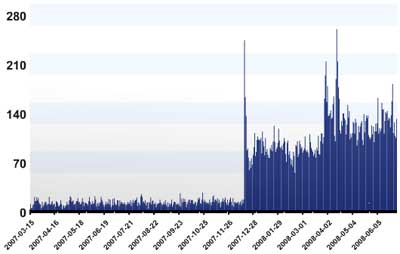
The plug in, like most, is really easy to install and only requires that you enter your Twitter login information. Whenever you post to your blog, a new tweet is posted through your Twitter account with the title and a link. This alerts your Twitter followers to your latest blog posts. Some people like this better than a feed reader because they can pick and choose which blogs to read based on the headlines.
The only thing I don’t like about this plug in is that a new tweet is sent even when you just edit an existing post. So if I know I’ll be going through old posts to update them (links, new info, whatever) I’ll disable the plug in temporarily and turn it back on. You can also edit the .php file of the plug in to prefix your title with whatever you want. As a default it’s New Blog Post: but you can make it say the title of your blog, New, whatever you like. This is helpful especially if you run more than one blog and run the automated tweets to the same Twitter account.
I highly recommend trying this out if you’re on Twitter (if not, get on it!). Also, share your experiences with Twitter Tools if you’re already an avid user!
Read More


