

Free Toolsday for May 20th
I learn so much just by hanging out on Twitter most of my day. I learned about a spectacular travel site called TripIt.com from Sam Harrelson.

This knocks TripAdvisor out of the park. I got on TripAdvisor thinking that it would be great a resource with all the reviews of hotels and attractions in the areas. But in the last year 99% of the travel I’ve done has been for work, where I’m not there for pleasure and I’m not necessarily choosing where we stay or go. So I don’t think I’ve logged into TripAdvisor in months. At least 6.
TripIt is a much more suitable replacement for me. And the user ease is AMAZING. But I’m getting ahead of myself. First, let me tell you the purpose of TripIt. The site works as a great organizational tool that aggregates your activities, meetings, hotel information, flight information, etc into a centrally located personal travel assistant. Just email your confirmation emails directly to plans@tripit.com and it integrates the details into your trip itinerary.
The itinerary itself is spectacularly thorough. Not only does it add your hotel info and flight info through the email, but you can also add different types of events, restaurant outings, and meetings. Everything is color coded and the site automatically adds Google Maps and Directions from one location to another into the itinerary. Here’s an example from my current trip to Boston:
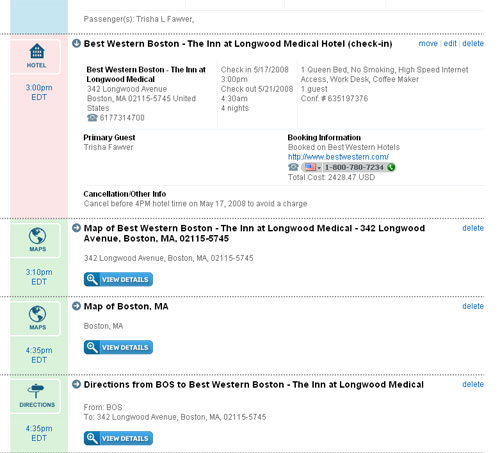
TripIt also integrates well with Google Calendar, which is my online calendar of choice, and adds exact time and details for each appointment, flight, check in, check out, etc. The site has a printable itinerary that is currently keeping me on track here in Boston, and if you’re more of a mobile/smart phone reliant person there’s mobile features as well. I only wish the printable version was color coded as well, but I understand why it’s not.
If you travel a lot for business, you should give this site a try at the least. As all the free toolsday features, it’s FREE! So you have no reason not to go check it out.
Read MoreOnline Video Toolkit – Live Today!
 Today is the date, kiddies! The launch of Jim Kukral’s latest joint, OnlineVideoToolkit.com, has brought your freebie early this week. Jim himself has said he’s never been the kind of guy to put up a 3 mile long sales page and sell the information he knows, so he’s giving it away! That’s right, all you have to do is sign up… give him your preciously guarded email address and the keys to the castle are yours!
I signed up a couple weeks ago and was invited to check it out yesterday before it was technically launched. So far Jim has 10 really informative videos up, covering the basic aspects like sound, editing, lighting, wardrobe, and of course your choice of camera. For anyone looking to seriously jump into online video and produce well made content for reasonable prices, this toolkit is a must have.
Jim’s been doing online video for some time now, and he’s one of the most vocal proponents of online video and it’s potential. Jim currently produces The Daily Flip on his website JimKukral.com and records the Video Ninjas podcast on GeekCast.fm with Magnify.net’s Steve Rosenbaum. So, brother knows what he’s talking about here! This is really the perfect resource for beginners and intermediate online video fans, and it’s free! So there’s really no excuse not to at least go check it out.
I’m already enjoying it, and it’s inspired me to make some more video. I know, I said that about podcasting too but I SWEAR I’m working on some of that as well! So I’m going to stop wasting time and go watch more of the videos at OnlineVideoToolkit.com in preparation for my trip to Boston next week, and I suggest you do the same!
Read MoreFree Toolsday for April 15th
 Happy tax day! Here’s a great free tool to save yourself some green. Honestly, I’m not sure why it’s taken me SO long to tell you about this tool. Anyone who’s ever had to hire a graphic designer for a really simple postcard or business card knows how frustrating it can be to put so much back & forth into a project that takes the designer 10 minutes to flesh out. Not to mention how much money it costs. This is why PsPrint launched the fabulous Design It! tool last year.
Design It! uses state of the art online graphic technologies that allow you to design a business card or postcard in mere minutes. It’s super easy to do the design work and ordering online. With the tool you can either upload your own background or photograph or pick from hundreds of stock designs that PsPrint’s internal graphic design team have developed since the launch of this tool.
You may be weary to use it since it it’s provided by a printing company, but there’s no obligation to buy. At no time do you put in your name or email address or anything unless you decide to order. So you don’t have to worry about receiving junk mail or anything after just giving it a try.
All text boxes are very intuitive to use when adding your custom text, and you can change fonts, colors, and customize the photos or logos you use on the cards. When designing postcards you can even add your own indicia to mail the cards professionally. At last count there are over 300 different templates for the business cards and over 150 templates for the postcards. PsPrint even has an open invitation to users to submit their feedback about what templates they’d like to see and what would improve the system.
Give it a try today. You have nothing to lose!
Read MoreCall me… seriously!
So, no one called me! My fragile little ego is destroyed! So I’m extending the contest… call the number and tell me jokes or something! Winner gets 100 Entrecard credits and some link love!
Read MoreBlogOnExpo – The Day is Here!
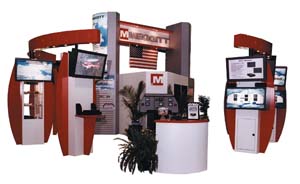 Let the games begin! The BlogOnExpo started today, with PsPrint as an exhibitor. There are some great sessions available online FOR FREE! This is the first free online bloggers expo of its kind. Setting precedents is important people! The organizer has done a bang up job of getting some pretty knowledgeable people interviewed and contributing to the online sessions. Today’s contributions are:
Sessions
- Social Media – Neil Patel from ACS SEO
- Logo Design Trends
- What to Do When you lose your Biggest Traffic Source – John Chow
- SEOmoz Guides – Rand Fishkin from SEOMoz
Interviews
- Matt Mullenweg
- Guy Kawasaki
- John Chow
- Darren Rowse
- Ryan Block
Having personally attended sessions with Neil Patel and Rand Fishkin on the panels, I can say that those will be great quality and I’m looking forward to checking them out. Darren Rowse is also a great guy (man behind ProBlogger.net) whom I enjoy following on Twitter, so that should be a good interview as well.
The expo will run for a few days, so mosey over and check it out.
Read More7. Give Stuff Away for Free
7. Give stuff away for free. (I don’t think this contradicts the previous point but maybe?) People love free. Offer a free version of your product, provide coupon codes, etc. Whenever we include a coupon code in a newsletter, there’s a big uptick in upgrades.
Over at 37 Signals, they have a great post today on 10 Ways to Get Ink. While we’re not giving something away outright for free, we are sponsoring another contest with PhotographyCorner.com. This time we’re providing some prizes for their 2007 Photograph of the Year Contest. I joined the forums over there myself last week when I got word we were sponsoring Contest Corner Challenge #43: Holiday Alphabetography. It’s a great little community over there, being a hobby photographer myself. Room for professionals and amateurs alike!
So go on over, join the forums, get to postin’, and enter to win!


