

Leaving on a Jet Plane

 I apologize, dear reader, as this blog has been on auto pilot lately. A lot has been going on in my world, both personal and professional, and it’s still taking a lot of time and energy to get sorted out.
The good news is, I’ll be back at the helm soon. I’m heading down to CJU tonight and then Blog World Expo next weekend, so I’m sure I’ll be super jazzed to come back to this blog in full force. Lots of travel in my future, which makes me slightly even more stressed considering I’m not the biggest fan of flying really, and I haven’t packed anything yet. Luckily, I have been traveling so much in the last year that I’ve gotten into the habit of keeping travel sized stuff always packed in my toiletries bag instead of packing the stuff I use normally. Travel size for the win!
CJU will be my first network event, and I’m excited. I was looking at the agenda last week in putting together my schedule, and I really appreciate that there aren’t really that many choices to choose from during the few break out sessions. I assume that most of the sessions are just put on my Commission Junction staff considering there’s no names attached to the sessions like other shows. The keynote will be given by Guy Kawasaki, a former Apple guy now working on AllTop.com. I’ve been following Guy on Twitter for sometime now, so seeing him speak in person will be nice. I know a few folks who’ll be there, so it should be a good time. My one regret is that I didn’t book soon enough to get into the conference hotel, Fess Parker’s DoubleTree Resort. I’ve heard great things, but booked too late so I’m staying nearby. Maybe next year!
On the opposite end of the spectrum, I checked out the agenda for Blog World Expo and there’s about 7-10 sessions per time block to choose from! It’s hard, because my interests vary and I know some good people on panels that I want to check out. Savvy internet marketers talking about monetization that I don’t mention nearly enough, Michael Buechele and Tim Jones. And of course there’s the usual suspects that I love – Jim Kukral, Lisa Picarille, Shawn Collins, etc. I’m not done scheduling for that since I have some tough choices to make in terms of which sessions to attend. I also noticed that one of my favorite musicians, Mike Shinoda, is going to be participating in one of the keynotes. I have no clue WHY lol, but I may have to throw my last Linkin Park CD into my bag in hopes of an encounter!
So, that is what’s on my plate for now. I only have part of a day in between CJU and BlogWorldExpo, so hopefully I’ll get the notes from my CJ sessions up for you to learn from before I’m off again! In the meantime, I hope you’re not overinundated with the daily definitions and happy to take a break 😉
Read MoreOnline Marketing Glossary: Client
Client:
- A software program that is used to contact and obtain data from a server software program on another computer. Each client program is designed to work with one or more specific kinds of server programs and each server requires a specific kind of client.
 Okay, in plain English for those that are not uber geeks, a client is an external program that is powered and contacts the internet. Some examples: Twhirl is a client for Twitter. Trillian is a client for multiple instant messenger services like AIM, Windows Live Messenger (formerly MSN Messenger), and Yahoo! Messenger. Ya dig?
____
Glossary Definition From ABC’s of Online Marketing by Alexandra Wharton, Issue 22, Revenue Magazine
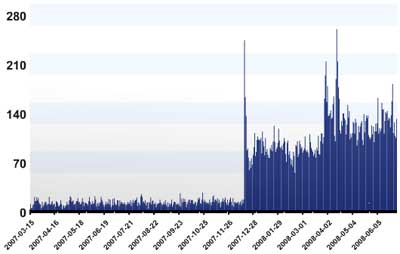
67 page views per day
Not bad considering that I haven’t been posting a lot of good content lately. I admit, I’ve been in a slump. A general lack of motivation and drive has resulted in my taking days upon days off and not blogging that much here. I’ve been spending ample time on Twitter, a good amount of time on my new fancy BlackBerry Curve, and of course doing what it is that I get paid for at PsPrint.
 Actually, my hats have been expanding here. I’ve been doing more web development on small projects to assist with our overloaded graphic services department, and I’ve been doing more development of images for our e-mail campaigns. It’s nice to have something new and different to do every once in awhile; it definitely is something I’m very capable and willing to do and breaks up the monotony of staring at CJ weeding through affiliate applications.
I’ve also given myself a sabbatical on the social networking. I haven’t sent anything through StumbleUpon or Digg, and haven’t been stumbling or digging anything lately either. It was getting to be too big of a distraction during the day, and trying to get everything done was a hassle.
Now it feels like things are calming down a bit now that we’re two weeks or so out from the holiday weekend and I’ll probably be picking up where I left off on the social media stuff, ramping up and collecting tips for my roundtable discussion next month.
Do you have any social media and networking tips to share?
Read MoreFree Toolsday for July 1st
WordPress boasts an impressive 3,464,799 blogs using their self-publishing service. Anyone who uses WordPress.org to power their blog like I do know that one of the best features is the ability to import countless plug ins to add different functions to your blog. One of the greatest ones I’ve found is Twitter Tools.
Twitter Tools integrates with Twitter by allowing you to archive your tweets, create blog posts from tweets or tweets from blog posts, as well as creating a daily digest post of tweets and posting tweets from the WP admin section. I have found this much more reliable than other automated tweeting services like twitterfeed. This is probably why over 25,000 people have downloaded this great plug in.
The plug in, like most, is really easy to install and only requires that you enter your Twitter login information. Whenever you post to your blog, a new tweet is posted through your Twitter account with the title and a link. This alerts your Twitter followers to your latest blog posts. Some people like this better than a feed reader because they can pick and choose which blogs to read based on the headlines.
The only thing I don’t like about this plug in is that a new tweet is sent even when you just edit an existing post. So if I know I’ll be going through old posts to update them (links, new info, whatever) I’ll disable the plug in temporarily and turn it back on. You can also edit the .php file of the plug in to prefix your title with whatever you want. As a default it’s New Blog Post: but you can make it say the title of your blog, New, whatever you like. This is helpful especially if you run more than one blog and run the automated tweets to the same Twitter account.
I highly recommend trying this out if you’re on Twitter (if not, get on it!). Also, share your experiences with Twitter Tools if you’re already an avid user!
Read MoreFree Toolsday for May 20th
I learn so much just by hanging out on Twitter most of my day. I learned about a spectacular travel site called TripIt.com from Sam Harrelson.

This knocks TripAdvisor out of the park. I got on TripAdvisor thinking that it would be great a resource with all the reviews of hotels and attractions in the areas. But in the last year 99% of the travel I’ve done has been for work, where I’m not there for pleasure and I’m not necessarily choosing where we stay or go. So I don’t think I’ve logged into TripAdvisor in months. At least 6.
TripIt is a much more suitable replacement for me. And the user ease is AMAZING. But I’m getting ahead of myself. First, let me tell you the purpose of TripIt. The site works as a great organizational tool that aggregates your activities, meetings, hotel information, flight information, etc into a centrally located personal travel assistant. Just email your confirmation emails directly to plans@tripit.com and it integrates the details into your trip itinerary.
The itinerary itself is spectacularly thorough. Not only does it add your hotel info and flight info through the email, but you can also add different types of events, restaurant outings, and meetings. Everything is color coded and the site automatically adds Google Maps and Directions from one location to another into the itinerary. Here’s an example from my current trip to Boston:
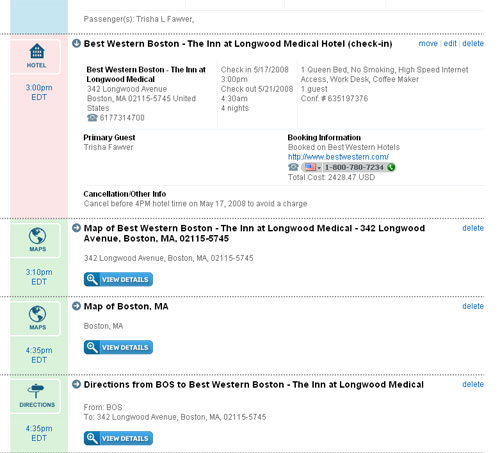
TripIt also integrates well with Google Calendar, which is my online calendar of choice, and adds exact time and details for each appointment, flight, check in, check out, etc. The site has a printable itinerary that is currently keeping me on track here in Boston, and if you’re more of a mobile/smart phone reliant person there’s mobile features as well. I only wish the printable version was color coded as well, but I understand why it’s not.
If you travel a lot for business, you should give this site a try at the least. As all the free toolsday features, it’s FREE! So you have no reason not to go check it out.
Read MoreSocial Media Pays Off
Whoever said that hanging around social media platforms never helped anyone is flat out lying. I’d like to think of myself as ahead of the curve in most situations. I try to be an early adopter whenever I can now. So I’ve been eager to jump onto the bandwagon with new social platforms like Social Thing and Britekite, most recently. I’m making a point to be a presence in the social media space for two reasons:
- Fun.
- Traffic.
 I am geekier than I care to admit most times, and I’ve always been into instant digital communication like email and instant messenger. Which is why I acclimated to Twitter so easily. Making the jump from LiveJournal to MySpace, then later to Facebook was a piece of cake. So I have a lot of fun hanging around talking to people, exchanging ideas, or just exchanging rather meaningless comments. I’m just an online oriented person. Not that I can’t carry on a phone call or face-to-face conversation, I just enjoy the technical aspects of writing. Blame it on the geek in me.
But as I mentioned, the other more beneficial reason for hanging about on these networks has been traffic to my blog here. I’ve always known that my efforts and time spent on Digg and Stumble Upon would eventually pay off. At the same time, I was never worried about whether they would or not since it was the fun that kept me there. Today I decided to check my Analytics account, something I don’t do nearly as often as I should. I found a wonderful sight.
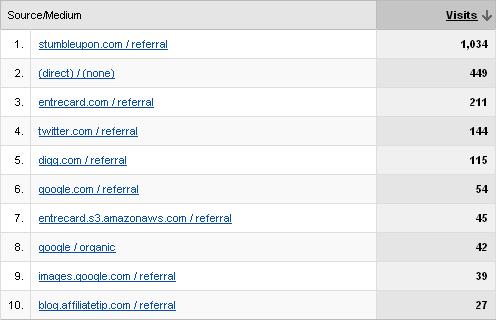
That’s right… my top 5 traffic sources include three social networks. This makes me totally happy that my addiction to these things is paying off. So listen to all of us social media nerds and register your brand names and participate. It’s just one of the many ways that you can make fun your job 🙂
Read More


