

Christmas Crafts 2013
For some reason this year I decided that I wanted to make a lot of my Christmas gifts to people this year instead of purchasing something. It wasn’t a financial reason… I think mostly I was just feeling crafty and had a lot of good ideas for people and thought “Hey I can make that”. Eventually, this is the final list of ALL the things I made! Unless you know me well, you probably won’t follow the list of names, but good luck trying 🙂
- A personalized cross stitched bookmark for my sister-in-law Bridget
- A personalized cross stitched bookmark for my sister-in-law Beatrice
- A personalized cross stitched bookmark for my sister-in-law Mary Clare
- A personalized cross stitched bookmark for my sister-in-law Genevieve
- A personalized ‘Baby’s First Christmas’ ornament for our newest nephew Charlie
- A personalized ‘Baby’s First Christmas’ ornament for our newest niece Brandy
- A personalized ‘First Fawver Family Christmas’ ornament for Charlie’s parents, my brother-in-law Michael & his wife Bridget
- A US Army ornament for my brother-in-law Michael (he’s a vet)
- A US Air Force ornament for my brother-in-law Zachary (he’s currently enlisted)
- A fleece baby blanket for Charlie
- A fleece baby blanket for Brandy
- A fleece baby blanket for our nephew Russy
- A fleece baby blanket for our niece Isabel
- A cross stitched giraffe ornament for Russy (I made him a personalized ‘Baby’s First Christmas’ ornament last year & want to make him one every year)
- A cross stitched ladybug ornament for my friend Veronica
- A cross stitched apple bushel & pie ornament for my friend Jennie
- “Wish” wine charms for my co-worker Judi (which doesn’t include the two book club custom sets she was nice enough to buy from me!)
- Doggy wine charms for my co-worker Ginette
- “Luck” wine charms for my co-worker Tanya
- Sports ball beer glass charms for my co-worker Randy
- Saints medal wine charms for my sister-in-law Celeste
- Sewing themed wine charms for my sister-in-law Monica
- Wine Lover wine charms for Dominic’s new boss
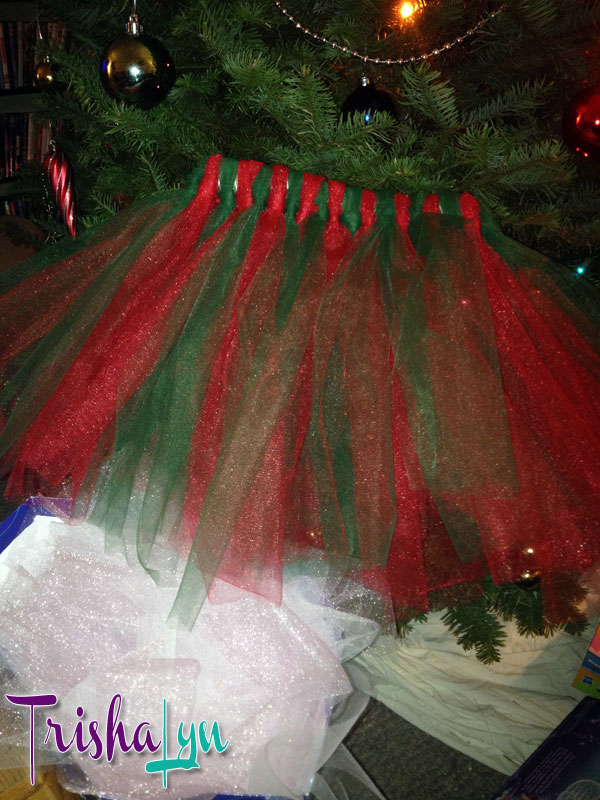
- A red & green tutu for Jennie’s daughter Joy
- A pink & white tutu for Joy
- Red & white polka dot hair ties for Joy
- A tulle decorated metal basket for Joy (it counts!)
- A tulle decorated hair band for Joy (I had extra tulle but not enough for another tutu!)
- A charm bracelet for my stepsister April (Russy’s mom)
- Designed a photo book of Russy’s baptism using photos I took & had Shutterfly print 2, one for April and one for her mom Joanna
- Designed a photo plaque for Dominic’s office at his new job, again using Shutterfly for the heavy lifting but it took some time to pick out the right photos!
- Personalized a stocking ornament for Charlie to add to the large family set I gave my mother-in-law last year.
That wasn’t even all the crafting I’ve done since October! I also…
- Used my Cricut to make decorations and vinyl cut outs for my Halloween pumpkins
- Constructed the accessories for my epic Stay-Puft Marshmallow (wo)Man costume
- Made a felt bag, just because I had extra felt (still do)
- Used the Cricut again to make table settings and such for Thanksgiving
- Cross-stitched a stuffed giraffe for Russy’s first birthday
- Put together a “My First Year” picture frame collage for April
- Made a paint bucket donation can for the San Leandro Historical Railway Society depot repainting fundraiser
- Made two sets of wine charms commissioned by my co-worker Judi for her book club’s annual gift exchange.
- Made some other wine charms to sell in my Etsy Shop (eh, I had the supplies out and needed to keep my hands occupied while catching up on the DVR)
- 4 ornaments from our high school and college tassels
- My yearly home made ornament for our tree (most are cross stitched but some are other mediums)
For ease, a photo album just for the crafts mentioned! I don’t have pictures of quite everything, but you’ll get the idea 🙂
Fussing Update
I fussed around more with del.icio.us, Digg, and Technorati. So far my thoughts…
 del.icio.us: really easy to use. I exported my bookmarks from Firefox and imported them into my bookmarks in a matter of minutes. I’ve spent probably the last half an hour cleaning up my tags since they’re so scattered and I’m a neat freak like that. But it’s a really simple interface that’s a breeze to use. I’ve head a lot about this site, so I get the feeling I’ll be using it a lot whenever I come across something particularly cool.
 Digg: pretty easy to use, but there’s a lot there. The home page of News & Videos is cracking me up reading some of the titles. Not sure how this can be leveraged though without digging my own stories. I did try a plea on Twitter for digs, but got none. And it’s taken me hours, but I’ve figured out how to add the Digg This button you see to the right. I found out though that I have a friend already on Digg, so I can foresee messing around more with this and building more friends on this network.
 Technorati: Okay what the hell? The main function of the site, as far as I can tell, is to keep a list of your favorites. Do me a favor and look HERE. Do you see any favorites? If you don’t I’m really annoyed because I followed their instructions to export my blogs from Google Reader, saved the file correctly, imported them to Technorati, they showed up for a couple minutes and now they don’t show. So my frustration is building with this site to the point where I’m already ready to give up… which for an experienced web user like me, isn’t good at all. So I’ve decided to walk away from it for awhile, focus my efforts on the other two, and mess around with this once they’ve got this bug fixed. I already ventured into their help forums on the first day… not really a good sign, folks.


