

Crush, Crush Baby – China Glaze Crinkled Chrome
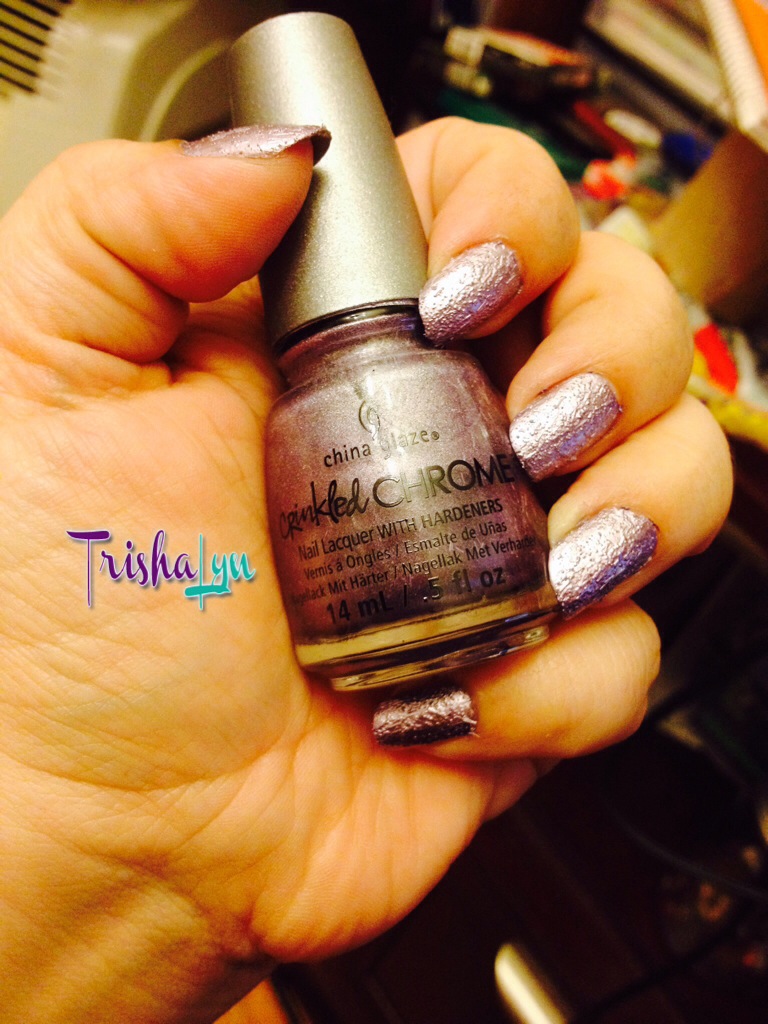
This Winter, there was a new textured polish on the block. I always loved the chrome looks that came out years ago, and I’m glad they seem to be making a comeback. I’m also a fan of textured polishes since they give new dimension to what could be a boring manicure. After looking high and low for the Crinkled Chrome collection from China Glaze in my local drugstores and beauty supply stores, I gave up and ordered from Sally Beauty Supply online. I decided to get two colors, China Glaze Crinkled Chrome Iron Out the Details and China Glaze Crinkled Chrome Crush, Crush Baby. I was in more of a purple/pink mood, so the first one I used was Crush, Crush Baby.
Read MoreWhy Was My Affiliate Application Declined?

I hear a lot of affiliates ask this question, wondering why their applications to some affiliate programs are declined. As an affiliate manager, there’s a lot of reasons why I might decline an affiliate application. I’m a very responsive affiliate manager, and will always answer this question when asked, however I know there are many managers out there that are, shall we say, less than stellar in the communications department. In an effort to bridge this gap, here are some things affiliates should consider when they come to ask an affiliate manager, “Why was my affiliate application declined?”
Are my website URLs correct?
I’ve seen instances where affiliates have misspelled their domain names accidentally, added an extra http://, left off the extension (.com? .net?). Many affiliate managers are, of course, savvy enough to just omit the extra http:// or try adding the .com to see if a website comes up, but I know some are not so diligent, so it’s best that you make checking your websites as easy as possible for the affiliate manager.
Have I been declined a lot?
There may be a bigger issue at hand, like your website’s hosting company being down or your pages not loading correctly. If you’re having your affiliate application declined a lot, you should check to ensure that all your sites are up and running and displaying properly. Try viewing your website in different browsers (Firefox, Internet Explorer, Chrome, etc) to see if something isn’t loading correctly. Some affiliate programs are very sensitive to the content and look of a site where their advertisements will potentially be seen.
Do I have any unprofessional or questionable content on my website?

Some brands are much more sensitive when it comes to the content on a website where their ad will appear. For example, the Apple Store has very strict guidelines relating to website content and where you can and cannot place the banner advertisements for the Apple Store. Larger brands tend to have more guidelines regarding their advertising, and may choose to decline you if your websites do not convey a likewise professional image that is on par with the brand. You can consider changing your website, removing the possibly unprofessional content, or finding an alternative merchant with more lenient standards on the website content.
Are all my websites listed in my profile?
Of course, some networks like LinkShare and Google Affiliate Network give you a separate profile to apply per website, so this isn’t necessarily a blanket issue. But in other networks, this may be a detriment not to list all your sites. Often affiliate managers are checking the affiliate’s websites and looking for a good niche or category fit. If you’re applying for a sports gear affiliate program and only have your knitting website listed, the affiliate manager may not see a good fit and choose to decline you. Having all your websites listed shows the affiliate manager that you work in different verticals and they can see more potential for appropriate promotions. Personally, I don’t know why an affiliate would ever not list a website unless it was less than ethical, but please comment if you have a good reason for not listing all websites.
I’m sure there are hundreds of other individual reasons why you might be declined. Some affiliate managers really check content for a good niche fit, while others allow multiple categories in. It all ultimately depends on the merchant and if their product would appeal to a wider audience or a more narrow audience of customer. Always attempt to reach out to the affiliate manager if you’ve been declined for a program you really want to promote. Most of the time you should receive some kind of response, either explaining why you were declined or giving you a chance to promote the program.
Read More


